Design the system.
Not the screens.
The design system layer for the AI era.
You author a machine-readable design system (tokens, components, motion, rules), and your AI coding agent reads it as a live contract over MCP, builds the real app to it, and stays on-design as you iterate. The end of AI design drift.
Works with Claude Code, Cursor, Claude Desktop, any MCP client. Free while in beta.
A real editor. Not a prompt box.
This is the actual app. You author the design system with the controls designers already know, and your AI agent builds to it.
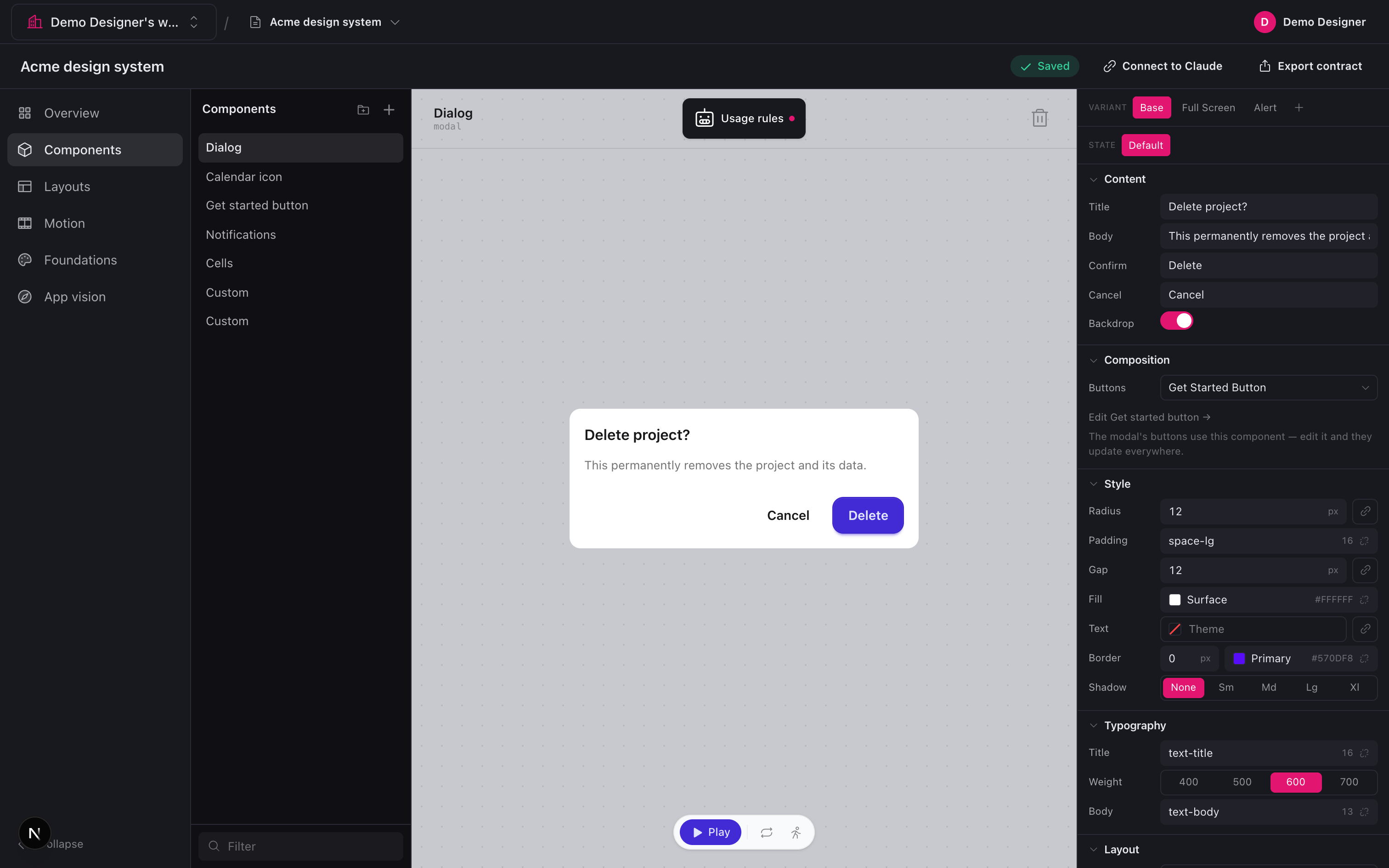
Author components, not screens.
Variants, states, and grouped property controls: Content, Composition, Style, Typography, Layout. The controls designers already know, plus plain-language usage rules the AI reads.
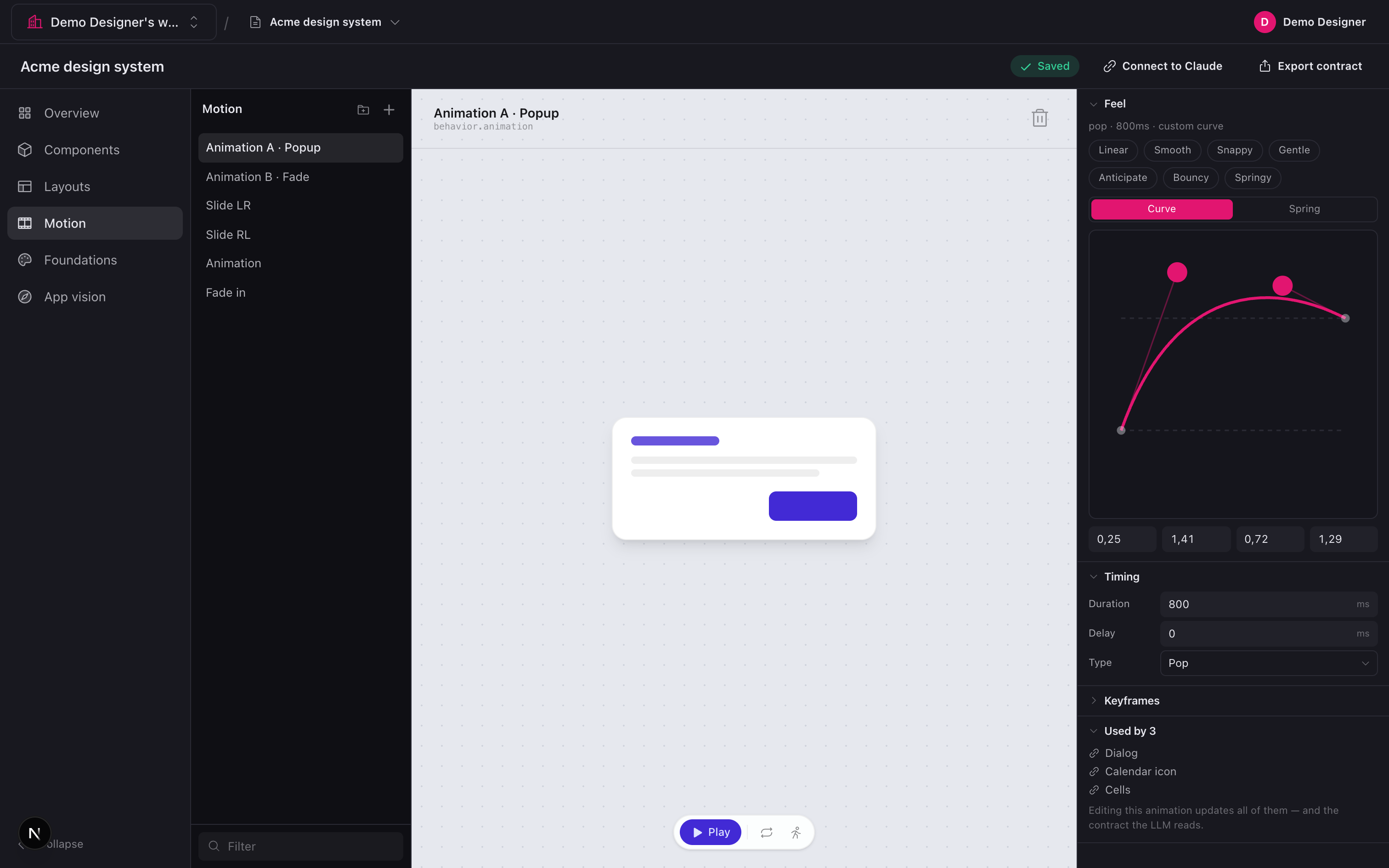
Motion as a real object.
A bézier and spring editor with feel presets and triggers. Motions are reusable and named: edit one and every component that uses it updates, in the tool and in the generated code.
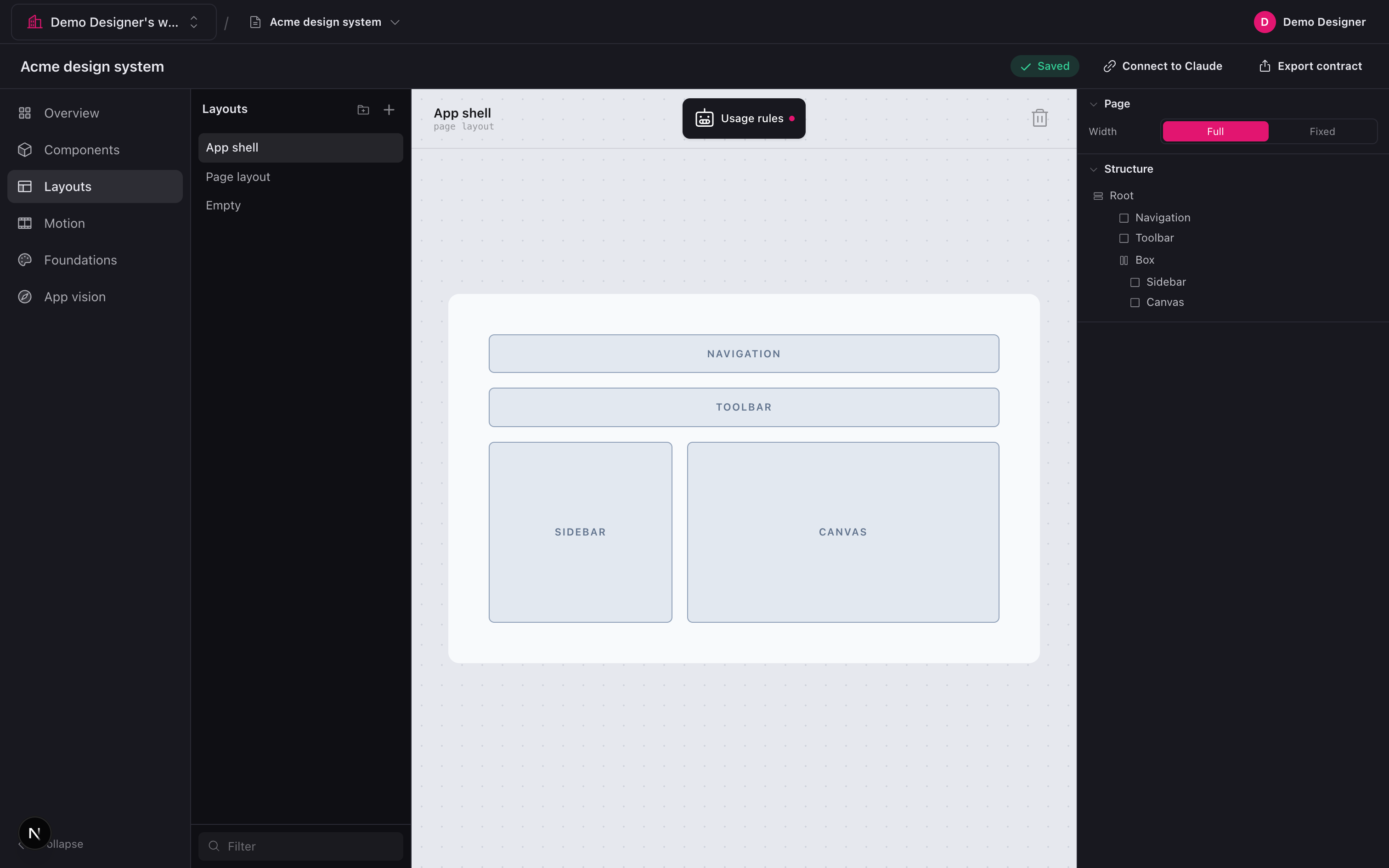
Structure-first layouts.
Nested stacks and splits, never absolute positioning. A clean structure tree that compiles to clean, responsive code, which is exactly why the AI output stays maintainable as the app grows.
“Build the whole app
with one prompt” is a fantasy.
AI coding tools produce inconsistent UI because they guess at your design on every screen. It looks right for thirty seconds, then the button gets reinvented, spacing drifts, the modal grows a new header, and the app stops looking like one product. Hand a machine a picture and it guesses. Hand it a contract and it cannot misread you.
- ✕ A lucky first draft you slowly lose control of
- ✕ Every new view re-guesses your spacing and color
- ✕ Change your mind and it regenerates from scratch
- ✕ “Looks AI-made”, because it is
- → You author the system once; the AI executes it
- → Every value is looked up, not estimated
- → Edit mid-build; it reconciles the existing code
- → You can still say: this works as designed
Three moves. No step ever feels technical.
Author the system
Tokens, components, states, motion, layouts and behaviors, built with the controls designers already know, with plain-language rules the AI reads. Edit a referent once; every use updates.
Serve it as a contract
The studio resolves global, type, and instance into one definite, machine-readable contract and serves it to your agent. Estimation becomes lookup. Connect by dropping a file in your project folder, no terminal.
Stay on-design
It serves a versioned “what changed since last build” diff, so the agent reconciles your existing code instead of regenerating. Change the design mid-build, and Claude picks it up.
*with a contract. A clear, machine-readable design system lets a smaller, cheaper model build more consistent apps than a frontier model guessing on its own. You do not need the most expensive plan to ship serious, on-brand work. The contract does the heavy lifting, so the model spends its budget building, not guessing what your design was supposed to be.
A real design tool, built for the AI era.
Foundations
Color, spacing, radius, type, with aliasing and a cascade. One source of truth.
Components and states
Variants, states, and plain-language “use it when / never when” rules.
Structure-first
Stacks and splits, never pixel-dragging, which is why the code comes out clean.
Real motion
Named motions (bézier, spring, presets) with triggers and smart defaults.
Behaviors
Component states and interaction rules: when this happens, do that.
App vision
Who it is for, the feeling, what must never happen. Coherence across the app.
Designer controls
Toggles, steppers, swatches, reference pickers. No slider-soup.
Tech-stack aware
Pick a stack, blank, or custom. Intent target-agnostic, output native.
One config in your project folder and it works in Claude Code, Cursor, Claude Desktop, or any MCP-compatible client. Tech stack is a parameter: web today, React Native and iOS next, native-idiomatic, never lowest-common-denominator.
“I stopped prompting screenshots and started shipping a system. The AI finally builds what I actually designed.”
“Editing a token and watching it ripple into the code is the thing I did not know I needed.”
“It made my AI build feel like a real product instead of a lucky first draft.”
The honest answers.
How do I stop AI from changing my design?
AI coding tools drift because they guess at your design every time they generate a screen, so nothing stays consistent. Design Prompt Studio lets you author your design system once and serves it to your AI agent as a live contract, so every value is looked up instead of re-estimated. When you change something, a versioned change-feed tells the agent exactly what moved, so it reconciles your existing code.
Why does AI keep producing inconsistent UI?
Because most AI coding workflows hand the model a prompt or a screenshot and ask it to estimate your design, so each generation reinvents your button and your spacing drifts. The fix is to replace estimation with lookup: give the agent an authored contract of your tokens, components, and rules so it builds the same system on every pass.
Is there a design system for Claude Code?
Yes. You build a real design system visually (tokens, components, states, motion, and plain-language rules) and connect it to Claude Code over MCP as a live contract it reads while building. You pair it by dropping one config file in your project folder, no terminal, and Claude Code looks up your spec instead of inventing UI on the fly.
Does Cursor follow a design system?
On its own Cursor tends to re-guess spacing, color, and components per file, which is where UI drift comes from. Design Prompt Studio gives Cursor (and Claude Code, Claude Desktop, or any MCP client) a machine-readable design contract over MCP, so it builds to your actual tokens and component rules, and a change-feed keeps it in sync when you edit mid-build.
How do I keep AI in sync when I change my design mid-build?
Usually this is the painful part: change the design and the AI regenerates everything from scratch. Design Prompt Studio solves it with a change-feed that serves a versioned what-changed-since-last-build diff, so the agent updates only what moved and reconciles your existing code instead of starting over.
What are MCP design tokens and how do I use them?
MCP (Model Context Protocol) lets AI agents read structured context from an external server, and design tokens are your named values for color, spacing, radius, and type. Design Prompt Studio resolves your tokens into a contract and serves them over MCP, so Claude Code or Cursor pull the real values instead of hardcoding approximations. Edit a token once and, because everything is by reference, every component and the generated code update together.
Is there a Figma alternative for AI coding?
Figma was built to draw screens for humans to look at, not to feed a machine a precise, buildable spec, which is why handing AI a Figma picture still makes it guess. Design Prompt Studio is the alternative built for AI coding: instead of pixel-dragging screens, you author a design system that exports as a machine-readable contract your agent builds to.
How do vibe coders keep their app from looking AI-made?
AI-built apps look AI-made when there is no enforced system underneath, so each screen reinvents the design. The move is to author a real design system (your own tokens, component variants, motion, and rules) and make your AI agent build to it as a contract instead of free-styling. It is built for vibe coders who want that control without touching a terminal.
Author the system. Keep control.
The AI executes. Your design stays ground truth. No terminal, no config, it just works.